NetMirror APK
Watch Movies & TV Series Online
Netmirror Download ⬇Netmirror offers free movies and seasons. Watch all your favourite shows in HD quality. Use it on your phone and PC.
NetMirror App
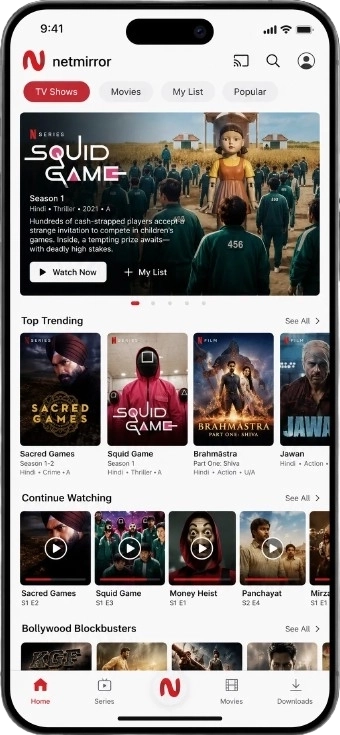
NetMirror is a name that users search for when exploring online entertainment, streaming options, and ways to access content across different devices. Whether you are looking for NetMirror APK, NetMirror app download information, or browser-based access, understanding how the platform works can help you make informed decisions.
This guide covers the NetMirror app, its commonly discussed features, installation considerations, device compatibility, login information, online access, and troubleshooting. It also explains important security and privacy precautions to consider before installing any third-party application.
What Is NetMirror APK?
NetMirror APK is an Android application package associated with the NetMirror name. An APK file is the installation format used by Android devices to distribute and install applications outside the standard app installation process.
People generally search for NetMirror to explore entertainment content, playback options, and different ways to access streaming services. However, the exact functions and available content can vary depending on the application version, source, and service being accessed.
How Does NetMirror Work?
An Android application typically provides an interface through which users can browse available content, search for titles, and access playback options. The actual experience depends on the application’s supported features and the availability of its content sources.
Before using NetMirror, check whether the version you have found is compatible with your device and comes from a source you can reasonably trust.
Is NetMirror an Official Streaming Platform?
The NetMirror name alone does not establish that an application or website is an officially licensed streaming service. Users should independently verify the developer, publisher, ownership, and distribution source rather than assuming that a website using this name is official.
Is NetMirror the Same as Netflix Mirror?
No. Similar names do not establish a connection between two services. NetMirror and Netflix should not be treated as the same platform. Netflix is a separately operated subscription streaming service, while the identity and ownership of third-party services using the NetMirror name should be verified independently.
NetMirror APK – App Information
Before downloading an application, reviewing its basic information is an important step. It helps you understand whether the file is suitable for your device and whether the download source provides enough information to evaluate it.
Common details to check include:
- App Name: Confirm that the application is identified as NetMirror.
- App Version: Check the version number and release information.
- APK File Size: Review the file size before downloading.
- Android Compatibility: Check the minimum supported Android version.
- Developer Information: Look for a verifiable developer or publisher.
- Package Information: Review the package name and available application details.
These details should be verified against the actual APK file. Do not rely on a website’s description alone.
Why Do Users Search for NetMirror?
Users search for NetMirror for different reasons, including entertainment discovery, application compatibility, and online access.
Content Discovery
A searchable content library can make it easier to explore movies, television programs, and other entertainment categories. Users generally prefer interfaces that help them find relevant titles without unnecessary navigation.
Device Compatibility
People often want to know whether an application works on Android phones, tablets, televisions, computers, or other devices. Compatibility depends on the software version and supported installation methods.
Available Viewing Options
Video quality, subtitles, audio settings, and playback controls can influence the viewing experience. However, these options should be checked within the actual application rather than assumed from promotional descriptions.
User Interface and Navigation
A clear interface makes it easier to browse categories, search for content, and manage available settings. Simple navigation is especially useful for people accessing entertainment applications on television screens.
Key Features of NetMirror APK
The following features describe commonly discussed capabilities associated with streaming applications. Their availability in NetMirror should be confirmed for the specific version being used.
Simple and User-Friendly Interface
An organized interface helps users navigate application sections, locate content, and understand available settings. Clear menus and readable labels can make the experience more convenient.
Content Library and Multiple Categories
Content libraries may organize entertainment into different sections, such as movies, television programs, documentaries, and animated content. The actual selection depends on the service and available sources.
Quick Search and Content Discovery
A search function helps users locate specific titles without browsing every category. Search filters, if available, can make content discovery more efficient.
Built-In Media Player and Playback Controls
Some entertainment applications include an integrated media player. Playback controls may include pause, resume, seeking, and screen orientation settings. Check the application itself to determine which controls are available.
Streaming Quality Options
Video quality settings can affect picture clarity and internet data consumption. Higher resolutions generally require more bandwidth, while lower resolutions may be more suitable for slower connections.
Subtitle and Audio Support
Subtitle and audio options can improve accessibility and make international content easier to understand. Supported languages and subtitle formats may differ between titles.
Personalized Recommendations and Custom Watchlist
Some applications offer recommendations or watchlists to help users organize content. These functions should not be assumed to exist in every NetMirror version.
Continue Watching
A continue-watching feature, when supported, allows users to return to previously opened content without searching for it again.
Multiple Language Support
Language settings can make an application easier to navigate. The availability of translated menus, audio tracks, and subtitles depends on the application and individual content sources.
Screen Casting and Multi-Device Compatibility
Screen casting allows supported devices to display content on a compatible television. Successful casting depends on device compatibility, network conditions, and the casting technology available.
Offline Viewing and Regular Updates
Offline downloads and automatic updates are not guaranteed features. Check the application’s actual functionality and update information before relying on either option.
What Type of Content Can You Explore on NetMirror?
The content available through a service using the NetMirror name may vary by version, region, and source. Common entertainment categories users look for include:
- Movies: Films from different genres and languages.
- Web Series: Episodic entertainment and online series.
- Drama and TV Shows: Television programs and drama collections.
- Anime and Animated Content: Animated series and movies.
- Documentaries: Informational and educational productions.
- Regional and International Content: Entertainment from different countries and regions.
- Language and Subtitle Options: Available audio and subtitle choices.
Always check content availability and licensing in your region.
NetMirror APK Download – Latest Version 2026
People searching for NetMirror APK Download generally want to find an Android installation file and understand whether it is compatible with their devices.
Before downloading an APK, consider these precautions:
- Identify the website or publisher distributing the file.
- Check the application’s version number and release date.
- Review the file size and package information.
- Examine the requested permissions.
- Scan the downloaded file with a reputable security tool.
- Avoid files that require unnecessary personal information or unusual access permissions.
A newer version is not automatically safer or more reliable. Confirm its source and compatibility before installation.
How to Install NetMirror APK on Android?
Android allows applications to be installed through APK files, but installing files from outside the official app store requires additional care.
Enable Installation from Unknown Sources
Depending on your Android version, you may need to authorize your browser or file manager to install applications from external sources. Only enable this permission when necessary, and disable it again after installation.
Locate the Downloaded APK File
Open your device’s file manager and locate the downloaded APK, usually inside the Downloads folder. Check the file name and size before proceeding.
Complete the Installation
If the file is compatible and passes your security checks, select it to begin installation. Follow the on-screen instructions and review any permission requests carefully.
Open and Check the Application
After installation, open the application and review its available settings. Avoid entering sensitive information if the publisher or login process cannot be verified.
How to Use NetMirror App?
The exact interface may differ between versions, but the general process for exploring an entertainment application is straightforward:
- Open the installed application.
- Review the available navigation menu.
- Explore content categories, if provided.
- Use the search function to find a specific title.
- Check available video quality, audio, and subtitle settings.
- Review application permissions and privacy options.
If a feature is missing, it may not be supported by your particular version.
NetMirror for Android
Android is a common platform for APK-based applications. However, not every Android phone or tablet will necessarily support every application version.
NetMirror APK for Android Phones
Before installation, check your device’s Android version, available storage, and hardware requirements. A compatible device can still experience problems if the APK is damaged or incompatible.
Android Compatibility Requirements
Minimum requirements should be confirmed from reliable application documentation. Avoid installing files that claim compatibility without providing meaningful version or device information.
Common Android Installation Problems
Installation may fail because of insufficient storage, an incompatible Android version, a corrupted APK, or an existing conflicting package. Rechecking the file and device requirements can help identify the cause.
NetMirror TV App
Television screens provide a different viewing experience from mobile phones. Users interested in NetMirror TV app compatibility should verify whether their particular television or streaming device supports the application.
NetMirror for Android TV
Android TV devices support compatible Android applications. Installation availability depends on the device, application package, and distribution method.
NetMirror for Smart TV
Not every Smart TV uses Android TV. Samsung, LG, and other television platforms have different operating systems and application ecosystems. An Android APK will not automatically work on every Smart TV.
NetMirror for Firestick
Fire TV devices have their own compatibility and installation requirements. Before attempting to install a third-party APK, review Amazon’s device guidance and assess the file’s security.
TV Remote Navigation
Applications designed for television screens should ideally support remote-control navigation. If an interface is built primarily for touchscreens, navigating it with a television remote may be difficult.
NetMirror for PC and Laptop
Users searching for NetMirror For PC usually want to access the service on a larger screen.
Can You Use NetMirror on Windows?
If a verified browser-based version is available, it may be accessible through a compatible desktop browser. Native Windows support should not be assumed without confirmation.
Using an Android Emulator
An Android emulator can run some Android applications on Windows computers. However, compatibility, performance, and security depend on the emulator and the APK being used.
NetMirror on Mac
Mac users should first check whether a legitimate browser-based version exists. Android APK files do not normally install directly as standard macOS applications.
PC Compatibility and Requirements
A stable internet connection, updated operating system, sufficient memory, and compatible software can improve performance. Emulator users may need additional system resources.
NetMirror iOS App
People searching for NetMirror iOS app information should understand that Android APK files are not designed for iPhones or iPads.
Is NetMirror Available for iPhone?
Availability depends on whether a legitimate iOS version has been released and distributed through an appropriate channel. Do not assume that an Android download link will work on an iPhone.
NetMirror for iPad
An iPad requires an application or web service compatible with iPadOS. Check the publisher and supported installation options before using an unfamiliar service.
Browser-Based Access on iOS
If a verified website provides browser-based access, users may be able to open it through Safari or another compatible browser. Check the site’s identity before signing in or sharing personal information.
iOS Compatibility and Installation Limitations
Avoid unfamiliar configuration profiles, certificates, or installation instructions that request unnecessary device access. Review Apple’s security guidance before installing applications outside standard distribution channels.
NetMirror Online – Web Version and Browser Access
NetMirror online searches generally reflect interest in accessing a service through a browser instead of installing an application.
What Is NetMirror Web?
A web version is an application or service that can be accessed through an internet browser. It may offer different functions from a mobile application.
How to Access NetMirror Through a Browser
If a legitimate and working website is available, open its verified address using an updated browser. Check the domain carefully and avoid suspicious redirects or unexpected download prompts.
NetMirror Website and Online Access
A website using the NetMirror name is not automatically an official service. Verify its ownership, privacy information, and security before using it.
App vs Browser-Based Access
An application may provide device-specific features, while browser access can reduce the need for installation. The better option depends on compatibility, security, and the functions actually available.
Browser Compatibility and Limitations
Updated versions of Chrome, Firefox, Safari, and Edge generally provide better security and compatibility than outdated browsers. Some websites may not support every browser or device.
NetMirror Login and Account Access
NetMirror Login is an important search topic for people trying to access a website or application associated with this name. However, login requirements may differ between services and versions.
Does NetMirror Require an Account?
Some applications allow limited access without registration, while others require an account. Do not assume that every service using the NetMirror name has the same login requirements.
Android App and Browser Access
If an application or website provides a login option, use only the verified interface. Review the publisher’s information and privacy policy before submitting personal details.
Login and Human Verification Problems
Verification pages may sometimes fail because of browser settings, network interruptions, blocked scripts, or service-side problems. Be cautious of verification requests that ask you to install unrelated applications or provide sensitive information.
Common Account Access Errors
Login issues may result from incorrect credentials, temporary server problems, outdated applications, or browser compatibility. Check the service’s legitimate support information rather than relying on unknown third-party instructions.
How to Identify a Fake NetMirror Login Page
- Check the complete website address.
- Look for suspicious spelling or domain variations.
- Avoid unexpected redirects and pop-up windows.
- Do not share passwords or payment details on unverified pages.
- Never install unknown files just to complete a login process.
- Look for a clear privacy policy and verifiable contact information.
How to Update NetMirror APK?
Keeping applications updated can help improve compatibility and address software problems. However, updates should only come from a trustworthy source.
Check the Installed Version
Open the application information or device settings to identify the installed version.
Find Available Updates
Check whether the developer or publisher provides a legitimate update channel. Avoid unofficial update notifications from suspicious websites.
Download and Install a New Version
Verify the new file’s source, package information, and compatibility before installing it. Keep a backup of important data where appropriate.
Check App Compatibility After Updating
After an update, review application permissions and test basic functions. If the application stops working, consider whether the new version is compatible with your device.
How to Cast NetMirror to TV?
Screen casting can allow content from a compatible phone or computer to appear on a larger television screen.
Casting Requirements
You generally need compatible devices, a supported casting method, and a stable network connection. Some casting technologies require both devices to use the same Wi-Fi network.
Connecting an Android Phone to Smart TV
Open your Android device’s supported screen-casting or screen-mirroring settings. Select your compatible television and follow the connection instructions.
Common Screen Casting Problems
If casting fails, check Wi-Fi connectivity, device compatibility, television settings, and software updates. Restarting the devices may also help resolve temporary connection issues.
NetMirror Compatibility and Technical Specifications
Device requirements can influence whether an application installs and runs properly.
Minimum Android Requirements
Check the application’s stated minimum Android version. Avoid relying on unverified compatibility claims.
Storage and Memory Requirements
Ensure that your device has enough free storage for the installation and sufficient memory for normal operation.
Performance on Low-End Devices
Older or entry-level devices may experience slower navigation or playback, especially when running demanding applications.
Streaming Quality and Data Usage
Higher video quality generally consumes more internet data. Users with limited data packages may prefer lower playback resolutions where available.
Hardware Acceleration Support
Hardware acceleration can help compatible devices process video more efficiently. Support depends on the application, operating system, and device hardware.
Is NetMirror Safe and Legal to Use?
Safety and legality are important considerations when evaluating any third-party streaming application or APK download.
Understanding Third-Party APK Risks
APK files distributed outside established app stores may carry risks, including modified software, malicious code, and unwanted permissions. A professional-looking website does not guarantee that a file is safe.
Checking the APK Download Source
Use sources that provide verifiable publisher information and transparent file details. Avoid websites that force unrelated downloads or display misleading security warnings.
Reviewing Application Permissions
Check whether requested permissions are relevant to the application’s purpose. Be cautious if an entertainment application requests access to contacts, messages, or other unrelated personal information.
Protecting Personal and Login Information
Use strong, unique passwords for legitimate accounts. Never share financial information or sensitive credentials with an unverified application or website.
Understanding the Privacy Policy
A trustworthy service should explain what information it collects, how it uses that information, and whether it shares data with third parties.
Copyright and Streaming Legality
Streaming and downloading rights depend on the content, its licensing, and the laws in your country. Users should choose authorized services and respect copyright restrictions.
Common NetMirror Problems and Their Solutions
Technical problems can occur because of application compatibility, network conditions, device settings, or service availability.
NetMirror App Not Working
Check your internet connection, restart the application, and confirm that your device meets the application’s requirements.
APK Installation Failed
Check the APK file, available storage, Android compatibility, and any existing conflicting installation.
App Keeps Crashing or Freezing
Restart your device, check for system updates, and review whether the installed version is compatible.
Video Not Playing
Confirm that the internet connection is stable and that the selected content source is available. If the problem continues, it may be a service-side issue.
Buffering or Slow Streaming
Reduce video quality if the option exists, close unnecessary background applications, and test your internet speed.
Black Screen During Playback
Restart playback, check device compatibility, and review display or hardware acceleration settings where available.
Audio Not Working
Check device volume, media settings, audio output selection, and whether the issue affects other applications.
Subtitles Not Working
Verify that subtitles are available for the selected content and that the correct language or subtitle option has been selected.
Download Failed Error
Check your available storage, internet connection, and whether downloading is supported by the application.
NetMirror Website Not Loading
Check the website address, internet connection, and browser updates. Avoid using suspicious alternative domains to bypass access problems.
Login and Verification Problems
Confirm that you are using a verified service address and check for temporary browser or network problems.
Network and Connectivity Errors
Restart your router if necessary, switch between available network connections, and check whether other websites are accessible.
NetMirror Update Problems
Verify the update source and device compatibility. Do not install unknown files simply because a website claims that an update is required.
NetMirror vs Netflix and Other Streaming Apps
NetMirror and established streaming services should be evaluated according to their ownership, content rights, features, pricing, and security.
NetMirror vs Netflix
Netflix is a recognized subscription streaming service with established applications and published support information. The identity, licensing, and service reliability of websites or applications using the NetMirror name should be independently verified.
NetMirror vs Other Streaming Applications
Other streaming applications may offer different content collections, subscription options, device support, and privacy protections. Compare their official distribution channels and terms before choosing one.
Content Availability Comparison
Content availability can vary by country, licensing agreements, and service catalogue. A larger advertised library does not necessarily mean that all titles are legally available.
Subscription and Pricing Differences
Check the official pricing information for each service. Be cautious of claims promising unlimited premium content without clear terms or a verifiable provider.
Device Compatibility and User Experience
Established streaming platforms generally publish supported-device information. For third-party applications, verify compatibility before installing.
Privacy and Official Support
Consider whether a service provides transparent privacy policies, official customer support, and clear information about its publisher.
Best NetMirror Alternatives in 2026
If NetMirror is unavailable or does not meet your requirements, several other platforms may be worth exploring. Their content, availability, and pricing differ.
- Stremio: A media-centre application that organizes content through supported add-ons and sources.
- CloudStream: An application known for its extensible content-source approach. Review the source and legality of any add-ons.
- Tubi TV: An ad-supported streaming service offering licensed entertainment in supported regions.
- Pluto TV: A free streaming platform with live channels and on-demand content in selected markets.
- OnStream: A third-party entertainment application whose availability and distribution should be independently checked.
- BeeTV: An application name associated with third-party streaming sources; review its safety and content rights carefully.
- Cinema HD: A third-party application name that users may encounter when researching streaming alternatives.
- PikaShow: A third-party application that should be evaluated carefully before installation.
- MovieBox Pro: A separately operated entertainment service. Check its current availability, terms, and official information.
For users who prefer established providers, services such as Netflix, Amazon Prime Video, and Disney+ may offer clearer licensing, support, and subscription information, depending on regional availability.
Why Do Users Search for NetMirror in Pakistan and India?
Search interest in NetMirror may reflect demand for convenient entertainment access and compatibility with commonly used mobile devices.
Regional User Interest
Users in Pakistan and India often search for information about entertainment applications, APK installation, and access options. Search interest alone does not establish an application’s safety or availability.
Language Preferences
Regional audiences may look for content in Urdu, Hindi, English, and other languages. Actual audio and subtitle options depend on the content source.
Android Device Compatibility
Android phones are widely used across both markets, making APK compatibility and installation instructions relevant topics.
Internet and Streaming Considerations
Internet speed, mobile data packages, and network stability can affect streaming quality. Users should select appropriate video settings where supported.
NetMirror Pros and Cons
Understanding the possible advantages and limitations of an application helps users make better decisions.
Advantages of NetMirror
- Users can research its available access methods.
- APK information helps Android users understand installation requirements.
- Device compatibility information can guide installation decisions.
- Online access may be convenient if a legitimate web version exists.
- Troubleshooting guidance can help users identify common technical problems.
Limitations of NetMirror
- Official ownership and publisher information may be difficult to verify.
- Third-party APK downloads can present security risks.
- Features and content availability may vary between versions.
- iOS, PC, and Smart TV compatibility should not be assumed.
- Licensing and regional availability may be unclear.
- Reliable customer support may not be available.
Frequently Asked Questions About NetMirror
Final Words About NetMirror
NetMirror is a search term associated with interest in entertainment applications, APK downloads, and browser-based access. However, users should look beyond promotional descriptions and understand the application’s actual identity, compatibility, features, and security considerations.
Whether you are researching NetMirror APK Download, NetMirror Login, NetMirror online access, or device compatibility, careful verification is essential. Check the source of every installation file, review application permissions, and avoid submitting sensitive information to unverified websites.
A well-informed decision helps you explore available entertainment options while protecting your device, personal information, and online privacy.